Plan your services
This article covers the concepts you'll use when planning your App's networking services.
What is a service?
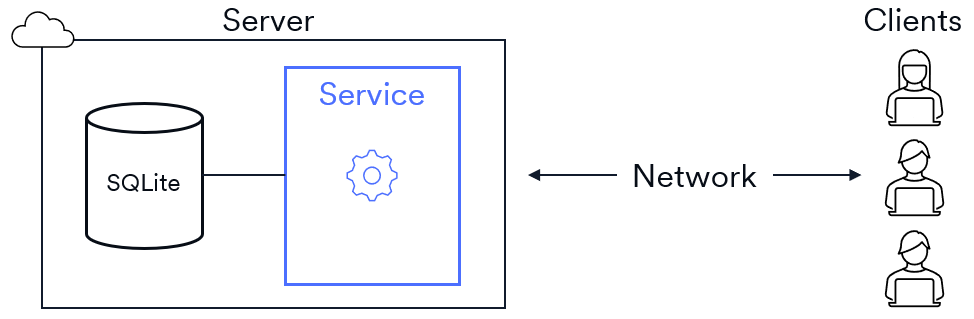
A service is a server-side component of your App that handles tasks for your clients. The service runs inside your App's server in the Root cloud. Clients send requests to the server and receive responses.
Decide on your operations
The first thing to think about when designing your services is what they'll offer to clients. For example, consider a SuggestionBox App that lets community members post and vote on suggestions. Members can also delete or edit their own suggestions.
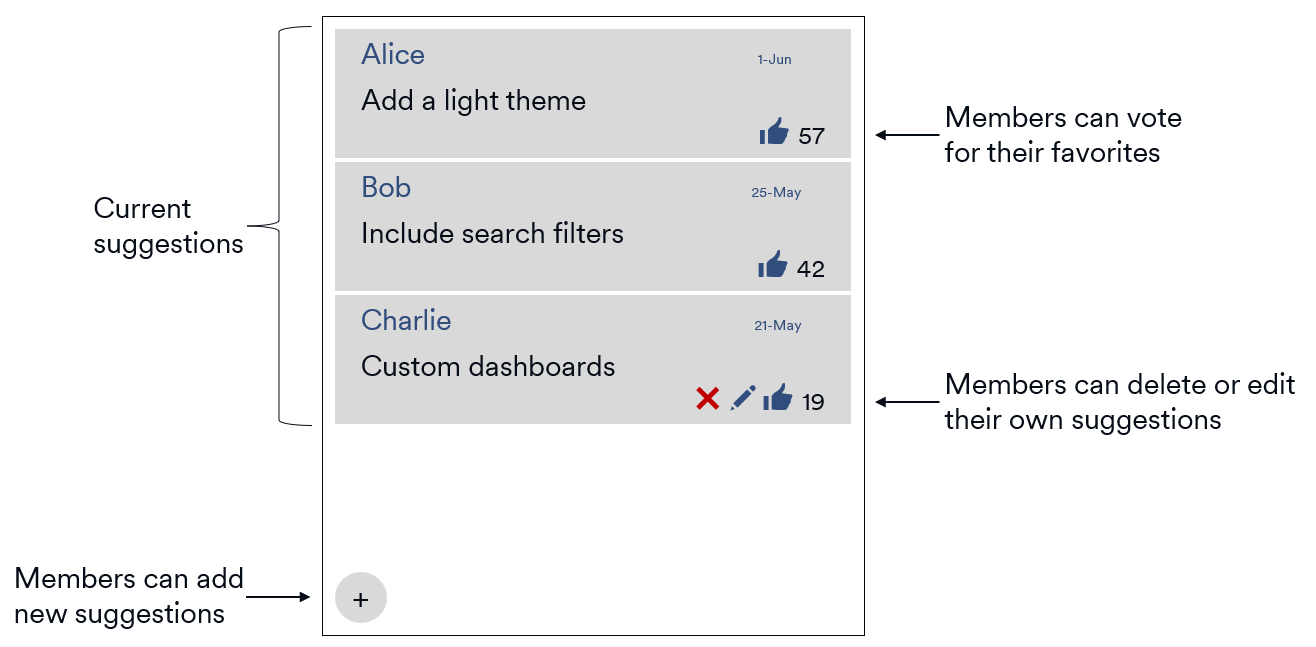
Which operations will the App's service(s) need to support? Think about the things the community members can do with the App. For example, members can post new suggestions, so the service will need a create-new-suggestion operation.
The core set of operations would be:
- Create new suggestion
- List all suggestions
- Update existing suggestion
- Delete existing suggestion
- Add vote
Organize operations into cohesive services
It's common for Root Apps to have multiple services, each handling a small, focused set of tasks.
Notice that the operations for SuggestionBox divide neatly into two categories: suggestion operations and vote operations. You'd create two services here: SuggestionService and VoteService. You could merge them into a single service, but separating them makes each one simpler to implement and easier to use. Both services store their data in the App's SQLite database.
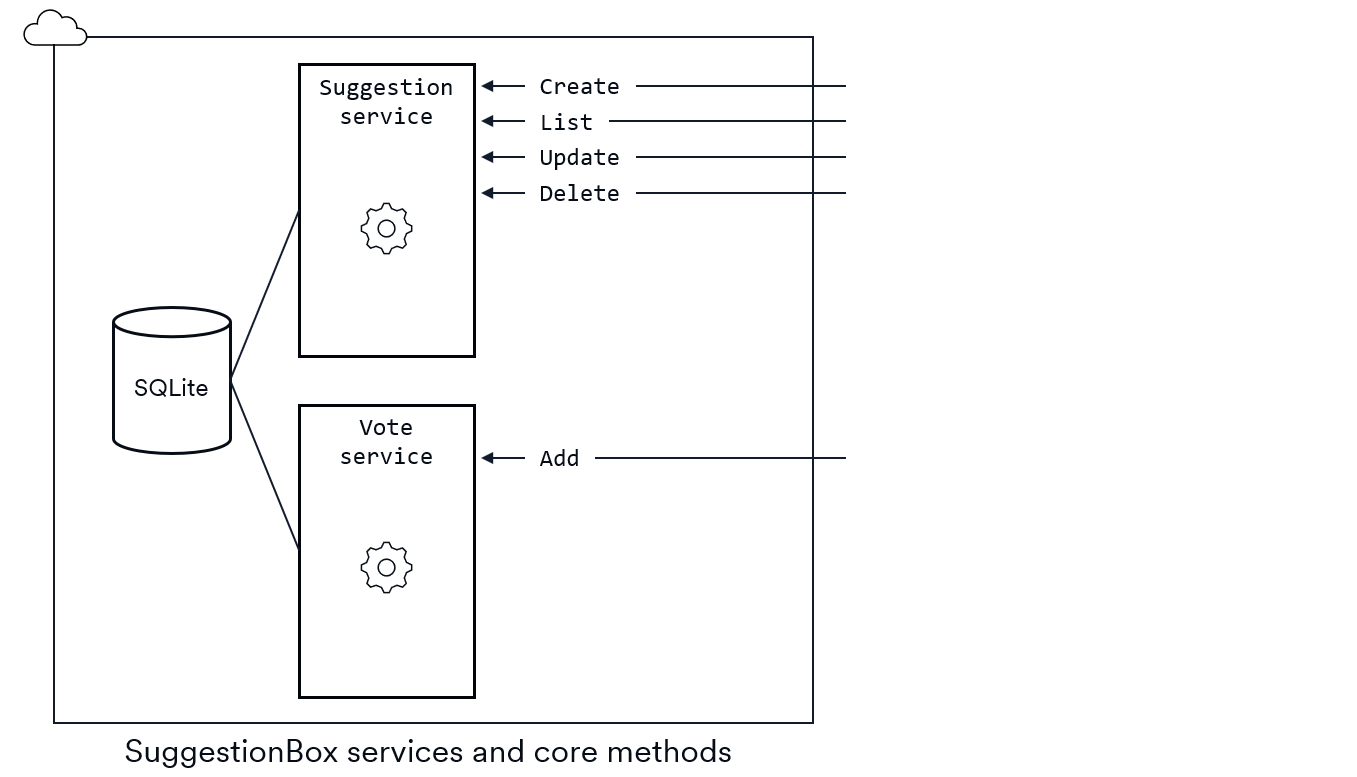
The SuggestionService shows a classic API pattern with its create, read, update, and delete operations. This group of four methods is usually referred to using the acronym CRUD and is common in many networking APIs.
Decide on your data flow
Next, think about the data flow in the operations. Each operation is a remote procedure call (i.e., called from the client but executed on the server), so we're really talking about the parameter that is passed from the client to the server and the response sent back.
For example, consider the SuggestionBox create-new-suggestion operation. When a member creates a new suggestion, they need to enter the suggestion text. That text will be sent to the service's Create method. The service will process the request by assigning a unique ID number, setting a createdAt timestamp, and adding the new suggestion to the database. That new suggestion object then becomes the return value of the Create method.
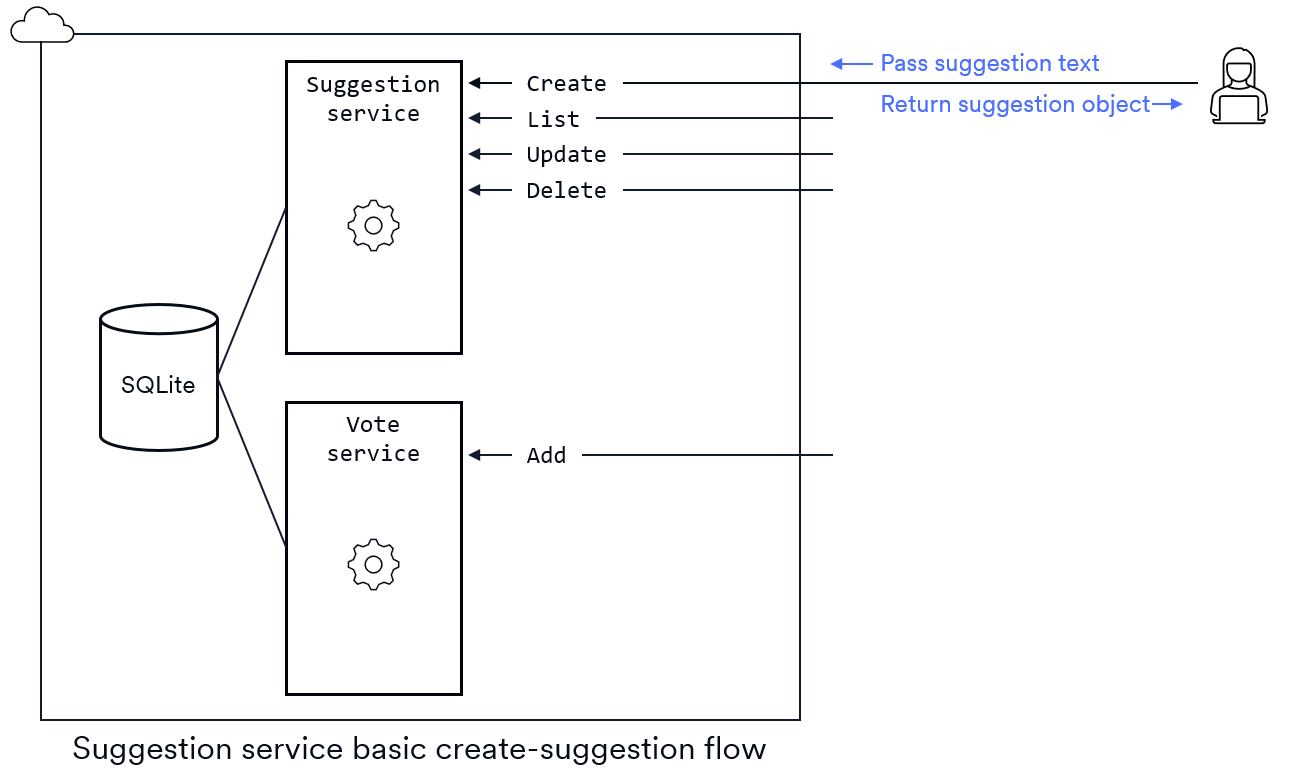
Why does the client need the suggestion object returned? Doesn't it already have the suggestion text? It turns out that the client really does need the new suggestion object for a couple of reasons: it might want to display the timestamp to the user, and it needs the suggestion ID for other operations like Delete. The timestamp and ID were generated on the server so returning the new suggestion object makes them available to the client.
Here are the recommended parameter and return values for the core suggestion operations:
| Method | Parameter | Return value |
|---|---|---|
Create | Suggestion text | New suggestion object |
List | None | Array of all suggestions |
Update | ID and new text | None |
Delete | ID | None |
Record user identity on the server
Every Root user gets a unique ID string when they create their Root account. Almost every service method you code will need to know this user ID so it can track which user made each request.
In SuggestionBox, the server has to know which community member called its Create method. The server will record that userId as part of the suggestion object it stores in its database. The suggestion object would typically have these properties:
- Suggestion ID
- User ID of the member that created it
- Timestamp when it was created
- User IDs of members that voted for it
- Suggestion text.
SuggestionBox uses the member identity to restrict delete/edit operations and to limit each user to one vote per suggestion. For example, the client side of the App enables the delete/edit UI only for suggestions that the current user created.
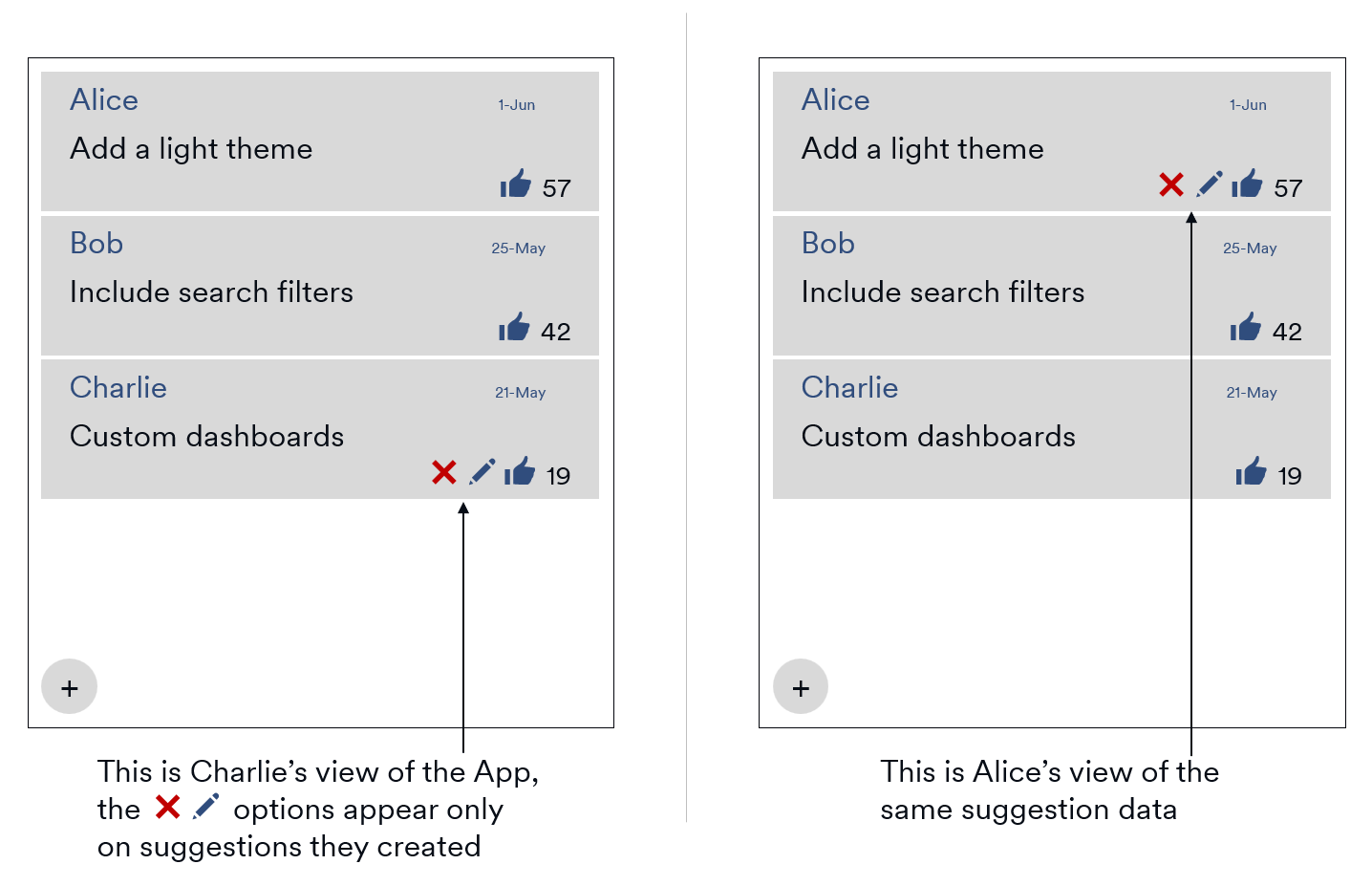
Since it's so common for the server to require the identity of the calling user, Root handles it for you. Root automatically passes client information to every incoming server-side method. You can access it in your server code through the userId property of the client parameter.
Add your broadcast operations
A broadcast method is a server-side method that sends a message to one or more clients. On the client side, they'll get an event raised when the broadcast arrives. Broadcast methods let you keep all clients synchronized to the latest data stored on the server.
The current state of the example SuggestionBox services will support a single client. However, Root Apps are multi-user, real time applications. When one client makes a change to any of data, all other clients need to know about it.
Consider what will happen right now if there were three clients in a community connected to the SuggestionBox App. If one client adds a new suggestion, the other clients won't update; they'd be out of sync with the data on the server.

The same issue happens with update and delete operations. In general, when one client makes a change, the server needs to let all the other clients know. To solve this, we'll add broadcast methods to the services.
The SuggestionService needs three broadcast methods: BroadcastCreated, BroadcastUpdated, and BroadcastDeleted. The VoteService only needs one broadcast method to notify clients when a vote is added: BroadcastAdded.
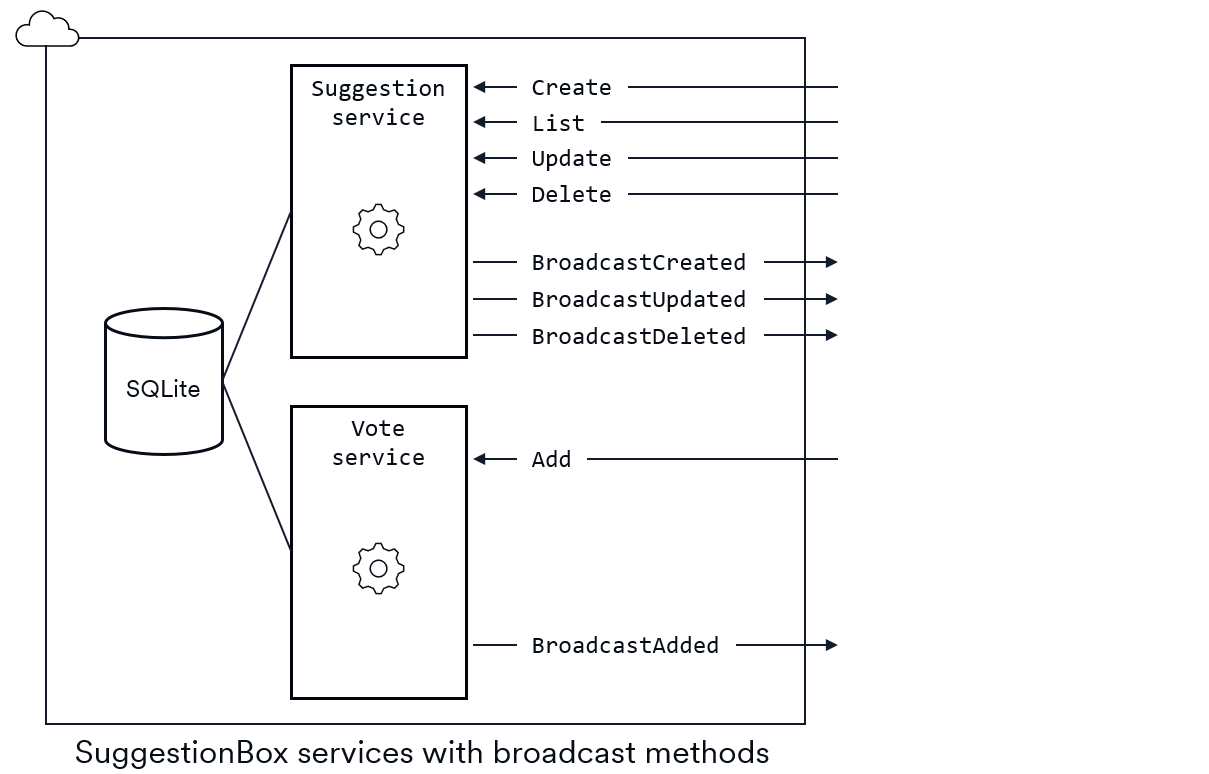
Broadcast methods can take an argument that gets sent from the server to the clients. In the SuggestionBox example, all the broadcast methods would send the new or updated suggestion object to the clients.
Behind the scenes, Root will do all the work to implement the broadcast functionality, but you need to specify which broadcast methods you want. You do this using a naming convention: any service method whose name starts with Broadcast is automatically implemented as a broadcast method by the Root tooling. The prefix string Broadcast is case-sensitive, so be sure to start with an upper-case letter.
With the broadcast methods in place, the request-response flows need to be updated with a broadcast call. For example, to create a new suggestion:
-
Request: Client calls the server's
Createmethod and passes the text of the new suggestion. -
Process: Service creates the new suggestion object: assigns a unique ID number, records the
userId, and sets itscreatedAttimestamp. -
Store: Service records the new suggestion in the App's SQLite database.
-
Broadcast: Service broadcasts the new suggestion to other clients. It's normal to exclude the original caller from the broadcast to slightly reduce networking overhead.
-
Response: Service returns the new suggestion to the original caller.
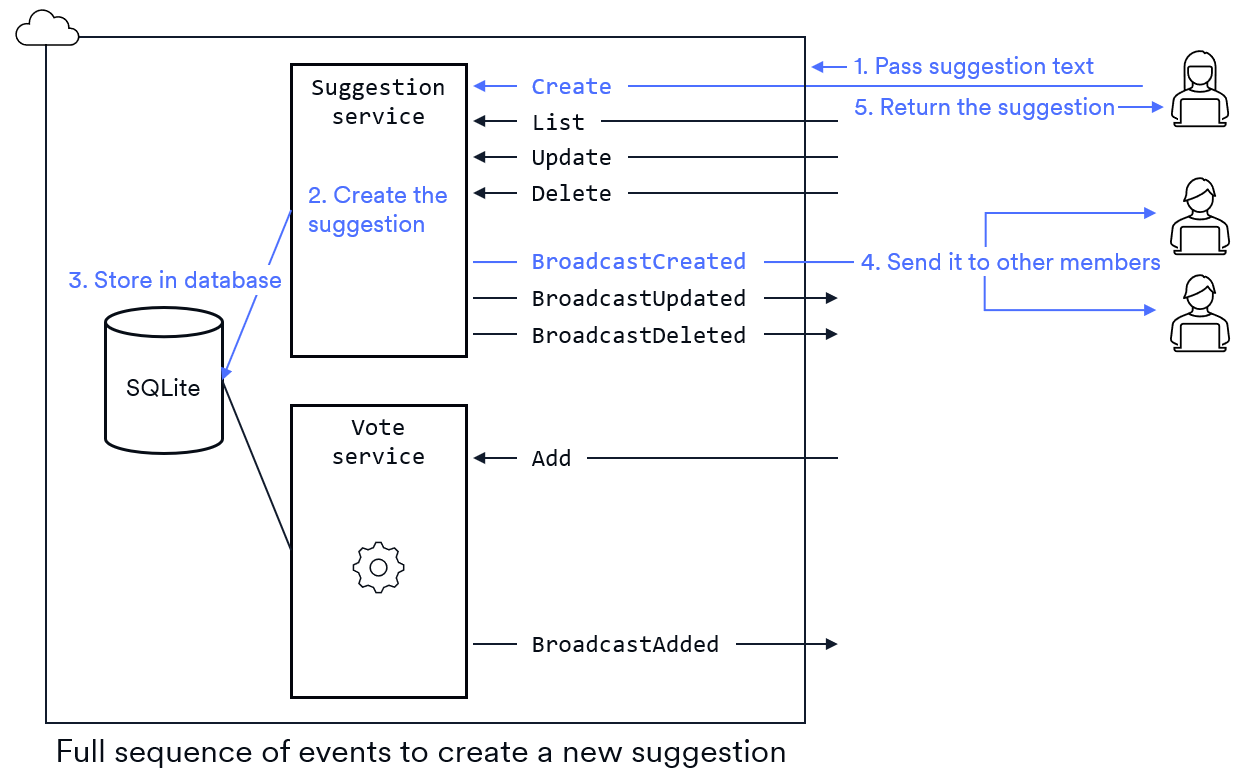
On the client side, each broadcast method triggers a unique event. Clients can subscribe to any events that are of interest to them. In the SuggestionBox example, the client code would need to subscribe to all four events to ensure its UI is always up-to-date.
Conclusion
Good service planning makes your Root App simpler, faster, and easier to build. Keep your services small and organized:
- Define clear operations
- Plan how data moves between client and server
- Track member identities
- Use broadcasts to keep everyone updated.