Define a service
This article covers how to define your App's networking services.
What is a service definition?
A Root service definition is a specification that captures the functionality the service offers to clients. It includes the service itself, all the message types it uses, and any enumerations:
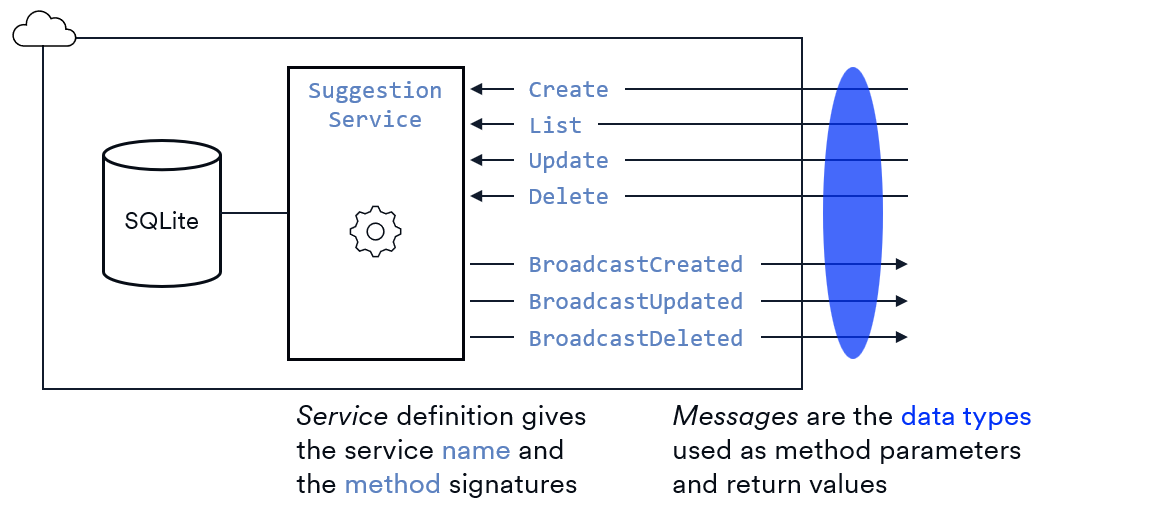
- Service: The incoming methods called by the client and outgoing broadcast messages used by the server.
- Message(s): The parameter and return types that are sent across the network between client and server. They're often called data-transfer objects (DTOs).
- Enum(s): Set of named integer constants used to represent a finite list of possible values; used as fields inside messages.
Here's a diagram showing what would be included in the definition of the SuggestionService from the SuggestionBox sample App.
What is protobuf?
Root services and messages are defined using Protocol Buffers (protobuf) version 3. Protobuf is a schema language and data serialization format. It includes:
- Syntax for defining services.
- Syntax for defining messages.
- Syntax for defining enumerations.
- A binary encoding format for efficiently serializing messages.
- A compiler to generate code from messages and services.
Message definition
A protobuf message is a named collection of fields. It's a type definition similar to a class or a struct in other languages. Messages are used as the parameter and return types for your service methods. By convention, message names use Pascal case where each word starts with a capital letter, no underscores.
syntax = "proto3";

message User {
  string name = 1;
  int32 age   = 2;
}
Each field in a message has:
- Type: Either a standard protobuf type or a user-defined message type.
- Name: Identifier using snake case (lowercase with underscores) by convention.
- Field number: The field numbers are an implementation detail to improve efficiency when these objects are sent across the network; they're not default values. You can use almost any numbers you'd like as long as they're unique within the message; just avoid 19000–19999 since those are reserved.
Comments
Protobuf supports two comment styles: single-line using // and multi-line using /* ... */.
syntax = "proto3"; // Required: Root uses protobuf version 3

/*
  Represents a user in the system
*/
message User {
  string name = 1;
  int32 age   = 2;
}
Standard field types
Protobuf includes several built-in data types you can use for your fields (called the scalar value types).
| Integers | Fixed integers | Floating point | Other |
|---|---|---|---|
int32 | fixed32 | float | bool |
int64 | fixed64 | double | string |
uint32 | sfixed32 | bytes | |
uint64 | sfixed64 | ||
sint32 | |||
sint64 |
Root Timestamp type
Root provides a Timestamp type since it's needed so often. It represents a time-zone independent point in time. To use Timestamp in your code, you import the file and use the full name rootsdk.Timestamp as a field type.
syntax = "proto3";

import "rootsdk/timestamp.proto";

message User {
  string name                  = 1;
  int32 age                    = 2;
  rootsdk.Timestamp last_login = 3;
}
Repeated fields
Message fields can be repeated to create a collection. When this is translated into TypeScript, the repeated field will map to an array.
syntax = "proto3";

message User {
  string name                   = 1;
  int32 age                     = 2;
  rootsdk.Timestamp last_login  = 3;
  repeated string phone_numbers = 4;
}
Message-type fields
A field type can be a message type. This lets you factor out common types and reuse them across your system.
syntax = "proto3";

message Address {
  string street = 1;
  string city = 2;
  string postal_code = 3;
}

message User {
  string name                   = 1;
  int32 age                     = 2;
  repeated string phone_numbers = 3;
  rootsdk.Timestamp last_login  = 4;
  Address home_address          = 5;
}
Optional fields
You can label any scalar-type field as optional. An optional field is one that may or may not be set in a message.
syntax = "proto3";

message User {
  string name                   = 1;
  int32 age                     = 2;
  repeated string phone_numbers = 3;
  rootsdk.Timestamp last_login  = 4;
  Address home_address          = 5;
  optional string email         = 6;
}
The easiest way to understand what's going on here is to imagine what happens when this protobuf is compiled into TypeScript: optional protobuf fields have the optional property modifier (?) added to their TypeScript definition.
For example, this protobuf:
message MyMessage {
  string r          = 1; // required
  optional string o = 2; // optional
}
will be compiled into the following TypeScript:
interface MyMessage {
  r: string;  // required
  o?: string; // optional
}
Message-type fields are automatically optional so the optional keyword is redundant.
Enum definition
A protobuf enum is a set of named integer constants used to represent a finite list of possible values for a field. It's similar to enums in other languages but with a few added special cases.
Enum syntax
Here's an example of the core definition syntax. Each of the entries inside the enum is called a value. The use of UPPER_SNAKE_CASE and the prefixing of the values with the enum name are protobuf conventions.
enum Category {
  CATEGORY_UNKNOWN     = 0;
  CATEGORY_ENGINEERING = 1;
  CATEGORY_BILLING     = 2;
  CATEGORY_MARKETING   = 3;
}
There are two special rules for the first value:
- It must be assigned zero.
- It should be named
ENUMNAME_UNSPECIFIEDorENUMNAME_UNKNOWN.
Enum use
Enums are used as field types inside message. In the SuggestionBox example, this enum could be used to divide suggestions into categories.
message Suggestion {
  uint32 id                         = 1;
  string author_id                  = 2;
  string text                       = 3;
  repeated string voter_ids         = 4;
  rootsdk.Timestamp created_at = 5;
  Category category                 = 6;
}
Service definition
A protobuf service is a collection of remote-procedure-call (RPC) methods that clients invoke over a network.
Service methods in Root can be either request-response or broadcast. You can tell them apart because broadcast method names start with the prefix Broadcast. Here's the full definition for the SuggestionService type.
syntax = "proto3";

import "rootsdk/types.proto"; // Import the rootsdk.Void type

service SuggestionService {
  // Request-response methods
  rpc Create(SuggestionCreateRequest) returns (SuggestionCreateResponse);
  rpc List  (SuggestionListRequest)   returns (SuggestionListResponse);
  rpc Update(SuggestionUpdateRequest) returns (SuggestionUpdateResponse);
  rpc Delete(SuggestionDeleteRequest) returns (SuggestionDeleteResponse);

  // Broadcast methods
  rpc BroadcastCreated(SuggestionCreatedEvent) returns (rootsdk.Void);
  rpc BroadcastUpdated(SuggestionUpdatedEvent) returns (rootsdk.Void);
  rpc BroadcastDeleted(SuggestionDeletedEvent) returns (rootsdk.Void);
}
The core syntax rules are:
- Use the
servicekeyword to define the service. - Service and method names should use Pascal case where each word starts with a capital letter, no underscores.
- Start each method with the
rpckeyword. - Add the keyword
returnsbefore the return type. - Include parentheses around the parameter and return types.
There are two additional rules imposed by the protobuf language to be aware of; these rules lead to a few cases that might not be intuitive at first.
First, parameter and return types must be messages; they cannot be one of the scalar value types.
service SuggestionService {
  rpc Create(string) returns (SuggestionCreateResponse); // ❌ Error, parameter must be a message type, cannot be a scalar
  // ...
}
Second, service methods must have exactly one parameter and one return type. If you have a method that needs multiple parameters, you bundle them inside a single message type since you can't list them separately.
service SuggestionService {
  rpc Update(Suggestion, string) returns (SuggestionUpdateResponse); // ❌ Error, only one parameter allowed
  // ...
}
Parameter list can't be empty (i.e., zero parameters aren't allowed).
service SuggestionService {
  rpc List() (SuggestionListResponse); // ❌ Error, parameter cannot be empty
  // ...
}
If you have a method that doesn't need a parameter, you still have to put a message type in the declaration. You can simply define a message type that has no fields. For example, the List method returns all current suggestions so it doesn't need a parameter; however, we'd still define a message type like this:
message SuggestionListRequest {
  // Intentionally empty, ready to add fields as needed in the future
}

service SuggestionService {
  rpc List(SuggestionListRequest) returns (SuggestionListResponse);
  // ...
}
The reasoning here is that you're now set up for future changes to your API. If you later decide to add a query parameter to the List method, you can add a field to the SuggestionListRequest type without changing the method signature.
Request-response methods
Request-response methods are called from the client and executed on the server. The SuggestionService has the following request-response methods:
service SuggestionService {
  rpc Create(SuggestionCreateRequest) returns (SuggestionCreateResponse);
  rpc List  (SuggestionListRequest)   returns (SuggestionListResponse);
  rpc Update(SuggestionUpdateRequest) returns (SuggestionUpdateResponse);
  rpc Delete(SuggestionDeleteRequest) returns (SuggestionDeleteResponse);
  // ...
}
Protobuf best practice is to define a unique message type for every method parameter and every method result. Message parameter names should end in Request and the message result name should end in Response.
The Create method is a good example of the standard pattern: it takes a SuggestionCreateRequest parameter and returns a SuggestionCreateResponse. These request and response types are used only for the Create method; other methods will get their own message types. Also notice that we created a separate Suggestion type because we'll reuse it in other request/response types later. Here's the complete definition for the Create method and its message types.
syntax = "proto3";

import "rootsdk/timestamp.proto";

message Suggestion {
  uint32 id                         = 1;
  string author_id                  = 2;
  string text                       = 3;
  repeated string voter_ids         = 4;
  rootsdk.Timestamp created_at = 5;
}

message SuggestionCreateRequest {
  string text = 1;
}

message SuggestionCreateResponse {
  Suggestion suggestion = 1;
}

service SuggestionService {
  rpc Create(SuggestionCreateRequest) returns (SuggestionCreateResponse);
  // ...
}
Broadcast methods
Root implements the concept of broadcast methods that send your message to a targeted set of the clients currently using your App. Broadcast methods are used on your server to notify one or more clients of state changes. For example, in SuggestionBox, when one user creates a new suggestion, the server needs to broadcast it to all other users.
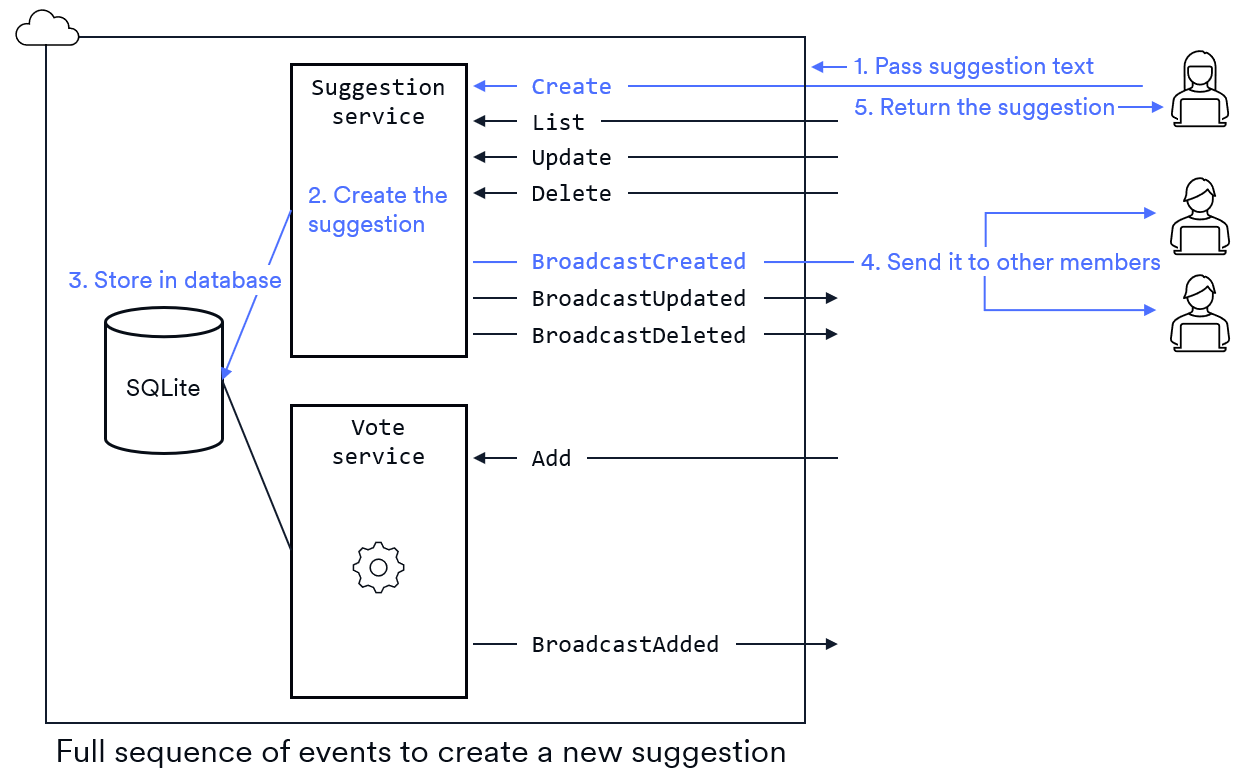
Broadcast methods are a Root-specific feature; they're not part of standard protobuf. Your broadcast methods will be fully implemented for you by the Root SDK tooling. All the details of locating the targeted clients and sending the message is handled for you.
To create a broadcast method, you simply add the prefix Broadcast to the service method name (the string Broadcast is case-sensitive). They're typically named using past tense (e.g., BroadcastCreated) since they represent something that's already happened.
In SuggestionBox, the server needs to notify clients whenever a suggestion is created, updated, or deleted. This means the SuggestionService would have the following broadcast methods:
syntax = "proto3";

import "rootsdk/types.proto";

service SuggestionService {
  // ...
  rpc BroadcastCreated(SuggestionCreatedEvent) returns (rootsdk.Void);
  rpc BroadcastUpdated(SuggestionUpdatedEvent) returns (rootsdk.Void);
  rpc BroadcastDeleted(SuggestionDeletedEvent) returns (rootsdk.Void);
}
The return type of every broadcast method must be rootsdk.Void. Remember that when you make one broadcast call on your server, it may get sent to hundreds of clients. Void is required as the return type because broadcast calls are one-way: those hundreds of clients don't each get to return a value to your server code.
By convention, you name your broadcast parameters with the suffix Event. This is because, on the client side, each broadcast method maps to an event. The parameter you pass to a broadcast method becomes the event object when the event is raised.
In the SuggestionService example, the messages used for the broadcast methods would look like this:
syntax = "proto3";

message SuggestionCreatedEvent {
  Suggestion suggestion = 1; // broadcast the new suggestion object
}

message SuggestionUpdatedEvent {
  Suggestion suggestion = 1; // broadcast the updated suggestion object
}

message SuggestionDeletedEvent {
  uint32 id = 1;            // broadcast only the id of the deleted suggestion
}
File organization
You can distribute your messages and services across multiple files. It's also fine to keep them all in the same file. Just make sure the file name(s) end in .proto. Standard practice is to use lower_snake_case for the file names.
The SuggestionBox example has two services, the SuggestionService we've used here as our primary example and the VoteService. We'd use three files for the protobuf:
- One for the SuggestionService and it's messages
- One for the VoteService and it's messages
- One for the
Suggestiontype that we'll need in both the SuggestionService and the VoteService. Both the SuggestionService and the VoteService willimportthis file.
syntax = "proto3";

import "rootsdk/timestamp.proto"; // Import the rootsdk.Timestamp type

message Suggestion {
  uint32 id                         = 1;
  string author_id                  = 2;
  string text                       = 3;
  repeated string voter_ids         = 4;
  rootsdk.Timestamp created_at = 5;
}
syntax = "proto3";

import "rootsdk/types.proto"; // Import the rootsdk.Void type
import "core_types.proto";         // Import the Suggestion type

// Create

message SuggestionCreateRequest {
  string text = 1;
}

message SuggestionCreateResponse {
  Suggestion suggestion = 1;
}

message SuggestionCreatedEvent {
  Suggestion suggestion = 1;
}

// List

message SuggestionListRequest {
  // Intentionally empty, ready to add fields as needed in the future
}

message SuggestionListResponse {
  repeated Suggestion suggestions = 1;
}

// Update

message SuggestionUpdateRequest {
  uint32 id   = 1;
  string text = 2;
}

message SuggestionUpdateResponse {
  // Intentionally empty, ready to add fields as needed in the future
}

message SuggestionUpdatedEvent {
  Suggestion suggestion = 1;
}

// Delete

message SuggestionDeleteRequest {
  uint32 id = 1;
}

message SuggestionDeleteResponse {
  // Intentionally empty, ready to add fields as needed in the future
}

message SuggestionDeletedEvent {
  uint32 id = 1;
}

// Service

service SuggestionService {
  rpc Create(SuggestionCreateRequest) returns (SuggestionCreateResponse);
  rpc List  (SuggestionListRequest)   returns (SuggestionListResponse);
  rpc Update(SuggestionUpdateRequest) returns (SuggestionUpdateResponse);
  rpc Delete(SuggestionDeleteRequest) returns (SuggestionDeleteResponse);

  rpc BroadcastCreated(SuggestionCreatedEvent) returns (rootsdk.Void);
  rpc BroadcastUpdated(SuggestionUpdatedEvent) returns (rootsdk.Void);
  rpc BroadcastDeleted(SuggestionDeletedEvent) returns (rootsdk.Void);
}
Conclusion
Defining your service is the second step in building a networked App. You use protobuf to describe the messages your clients and server will exchange, and to define the service methods they’ll call. Once you’ve written your service definition, you're ready to compile it into TypeScript code and start implementing the logic.