Define your App's features
Before you write code, take some time to plan. This article walks through standard planning steps, tailored for Root. If you’ve built software before, you may be able to skim through this.
By the end of this article, you’ll be able to:
- Define the purpose of your Root App
- Choose three core features to include at launch
- Compare other solutions and find ways to improve on them
- Outline a basic user flow for your App
Step 1: Define the purpose
Start with the core question: What problem does your App solve?
Every Root App should help a community collaborate better. Ask yourself:
- What kind of community would use this?
- What specific problem are they facing?
- How does your App help them solve it?
If you can’t tie the idea back to teamwork or collaboration, it may not be a good fit for Root.
Step 2: Choose core features
Next, list the essential features. Keep it simple—start with what’s needed to make the App useful on day one.
Think about:
- Main actions – What should users be able to do?
- Ways to collaborate – How will users work together?
- Communication – Will you need comments, messages, or notifications?
Avoid overloading your first version. A few strong features are better than a bloated design.
Step 3: Look at similar tools
See what’s already out there. Ask:
- Are other Apps solving the same problem?
- What do they do well? What’s missing?
- How can yours be better?
This will sharpen your idea and help you build something that stands out.
Step 4: Sketch how it works
You don’t need to be a designer—just map out how users move through the App. Use simple drawings, flowcharts, or notes to answer:
- What does the main screen look like?
- What happens when someone clicks a button or completes a task?
- How do users work together?
Having a rough structure will make development faster and easier later.
Step 5: Prioritize features
Now that you have a feature list, sort it into two groups:
- What’s needed for your minimum viable product (MVP)—the smallest useful version you can launch
- What can wait for later, based on feedback or growth
Prioritizing now keeps your scope realistic and your timeline short.
Step 6: Talk to users
Before you start building, check your assumptions. Share your idea with potential users and ask:
- Would you use this?
- What part seems most useful?
- What’s missing?
Early feedback helps you avoid wasted work and make better choices.
Example: SuggestionBox
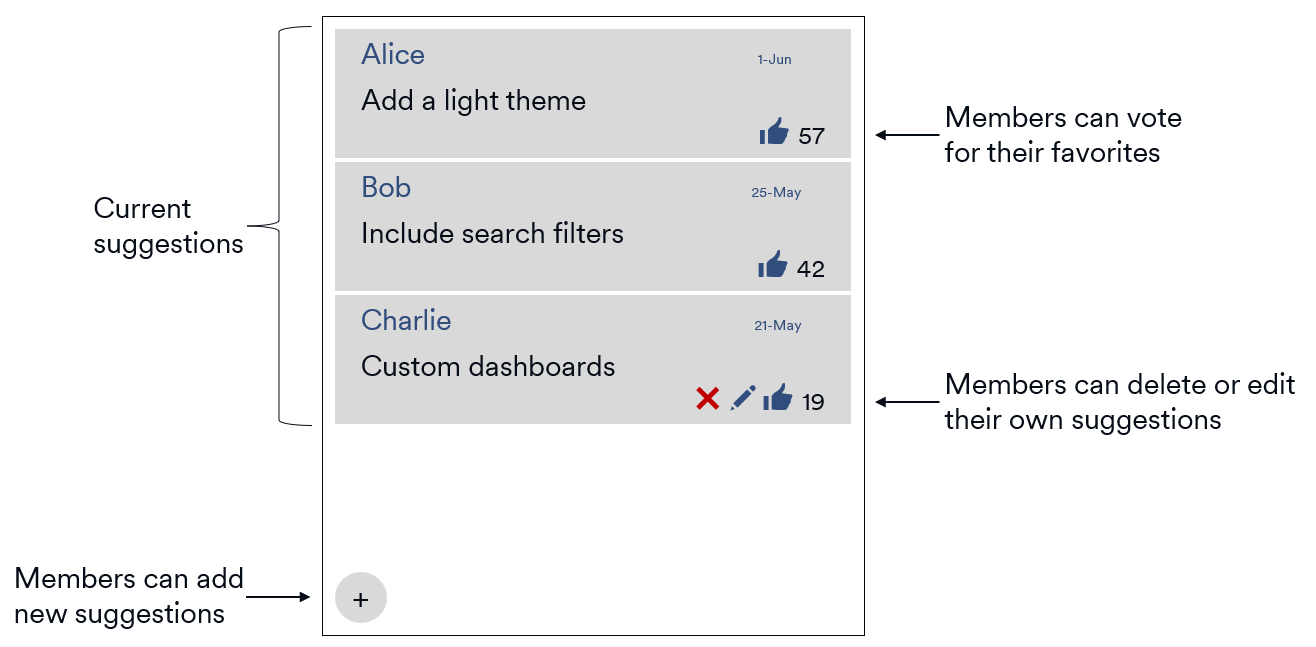
Take SuggestionBox, a Root App for collecting feedback from community members. The MVP includes two features:
- Let members submit text suggestions
- Let members vote on existing suggestions
Later, you could add features like commenting or attaching images.
Here’s a mockup of the MVP interface:
Conclusion
With a clear purpose, a short feature list, and a rough user flow, you’re ready to start building. You’ve looked at other tools, planned your MVP, and gathered early feedback. These steps will save time, reduce rework, and help you launch a Root App that actually solves a real problem.